Dreamfare for Claude
Claude Trip Planner: Turn a Conversation Into a Trip
Dreamfare is a Claude trip planner you connect once. Think the week through out loud, and the itinerary lands in your account structured, mapped, priced and bookable instead of scrolling away in the chat.
The connector URL
Add a custom connector in Claude and paste this. Streamable HTTP, OAuth sign-in.
https://api.dreamfare.app/mcpListed in the official MCP Registry as app.dreamfare/mcp.
The problem
Conversation is the best way to plan, and the worst way to store a plan
Talking a trip through is genuinely good. You get pushed on the pace, you find out the museum is shut on Tuesdays, you change your mind twice. Then the conversation ends and what you have is a transcript: no dates, no map, nothing bookable, nothing your travel companion can open.
Setup
Four steps, once
- 1
Open Claude's connector settings
In Claude, go to Settings and then Connectors. This works on claude.ai, Claude Desktop and the Claude mobile apps.
- 2
Add Dreamfare as a custom connector
Choose Add custom connector, name it Dreamfare, and paste the Dreamfare MCP endpoint as the URL. Then choose Add.
- 3
Connect and sign in
Press Connect. A Dreamfare sign-in opens in your browser. It is OAuth, so Claude never sees your password and you can revoke it later from the same screen.
- 4
Plan, then keep it
Talk through the trip. When it is right, ask Claude to save it to Dreamfare and it becomes a real itinerary with days, a map and booking links.
Every plan, including free
Anthropic offers custom connectors on Free, Pro, Max, Team and Enterprise. A free account can hold one at a time, which is worth knowing before you spend it on something else. On Team and Enterprise an owner adds the connector first, then everyone else can switch it on.
Other MCP clients
Claude Code, Cursor, VS Code and your own agents can add the same server. The developer page has the commands, and the tool reference is readable without signing in.
A real example
Ten days in Peru, argued into shape
The trip that benefits most from a conversation is the one with a hard constraint in it. Altitude, one fixed date, and a person who does not want to hike.
Ten days in Peru in June. We land in Lima, we want Cusco and the Sacred Valley, and one of us gets altitude sickness badly. Machu Picchu is booked for the 14th.
Then Cusco cannot be day two. I would give Lima three nights, go to the Sacred Valley before Cusco because it sits lower, and keep the 14th fixed with a slow day either side of it.
That works. Save it to Dreamfare as a ten-day trip and put real places in the Sacred Valley days.
Saved. Ten days, with the Sacred Valley on days four to six, Machu Picchu fixed on the 14th, and named places on each day rather than placeholders.
Find somewhere to stay in Ollantaytambo for those nights and show me what is still unbooked.
Three options for those dates with prices, and the trip has four stops left that can be booked. Each one has its link on the stop.
The reasoning stayed in the chat. The result is a Dreamfare trip: ten days, real venues with addresses, an altitude-aware order, one fixed date, and booking links where they exist. Open it on a phone in Cusco with no conversation history required.
What you can ask for
Six things the connector can do
Build and edit the itinerary
Create a trip, add stops with times, move them between days, rename them, keep the packing list and the trip notebook. The chat is doing the same work the app does.
Find real places and price them
Search stays and activities for the destination and dates, look at one in depth, or compare several side by side before anything is added.
Import what inspired the trip
Hand it a TikTok, Reel, YouTube link or an article and the places inside become pins you can drop into the plan.
Bring other people in
Ask for an invite link, post in the trip chat, or check who is on the trip. The people you invite never need Claude to take part.
Come back to it later
The next conversation can read the trip as it stands, including changes you made in the app in between. There is one trip, not a copy per surface.
Only your own account
The connector acts as you, with the permissions you already have. Shared trips keep their roles, and nothing is booked or paid for on your behalf.
What the answers look like
Interactive cards, inside the conversation
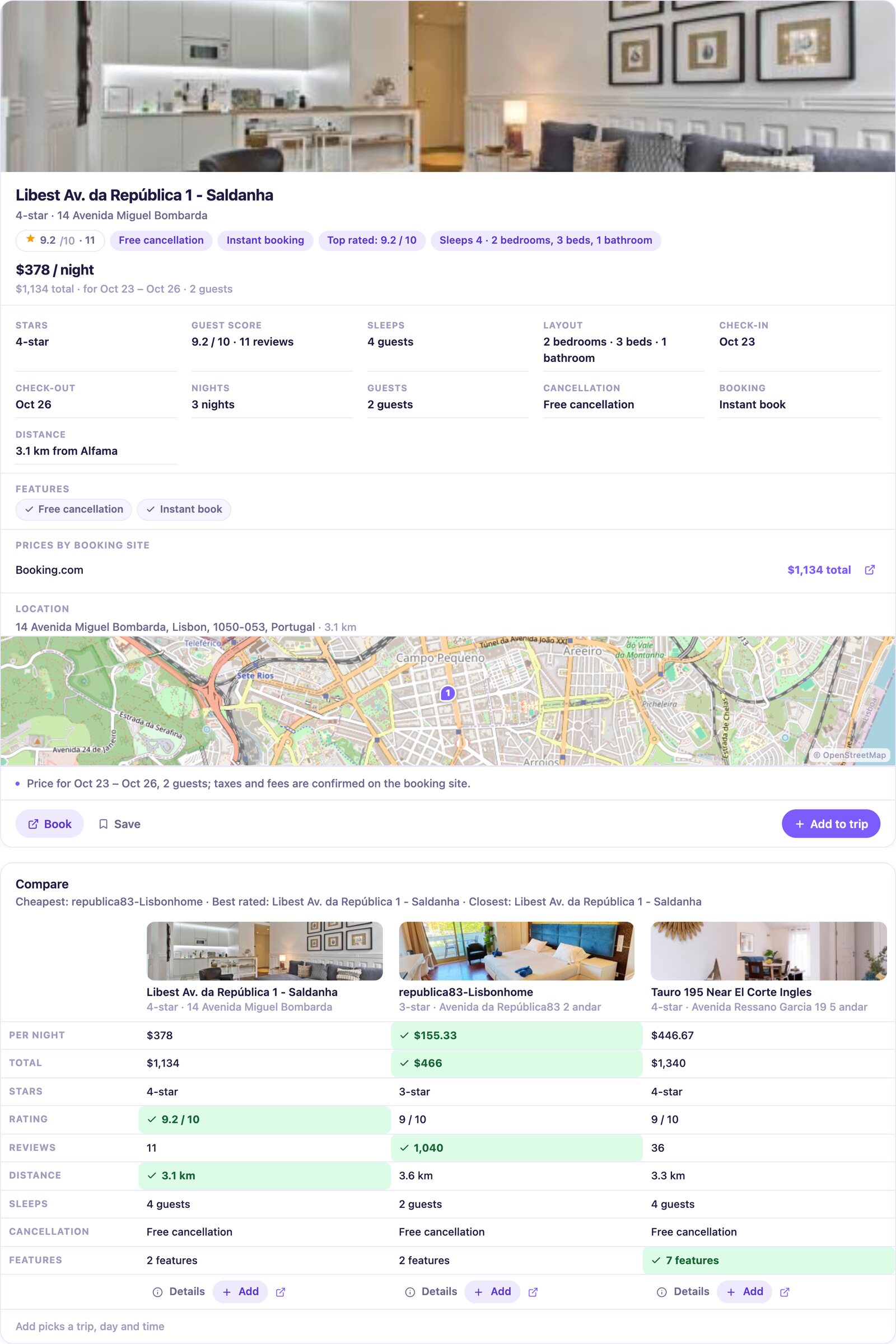
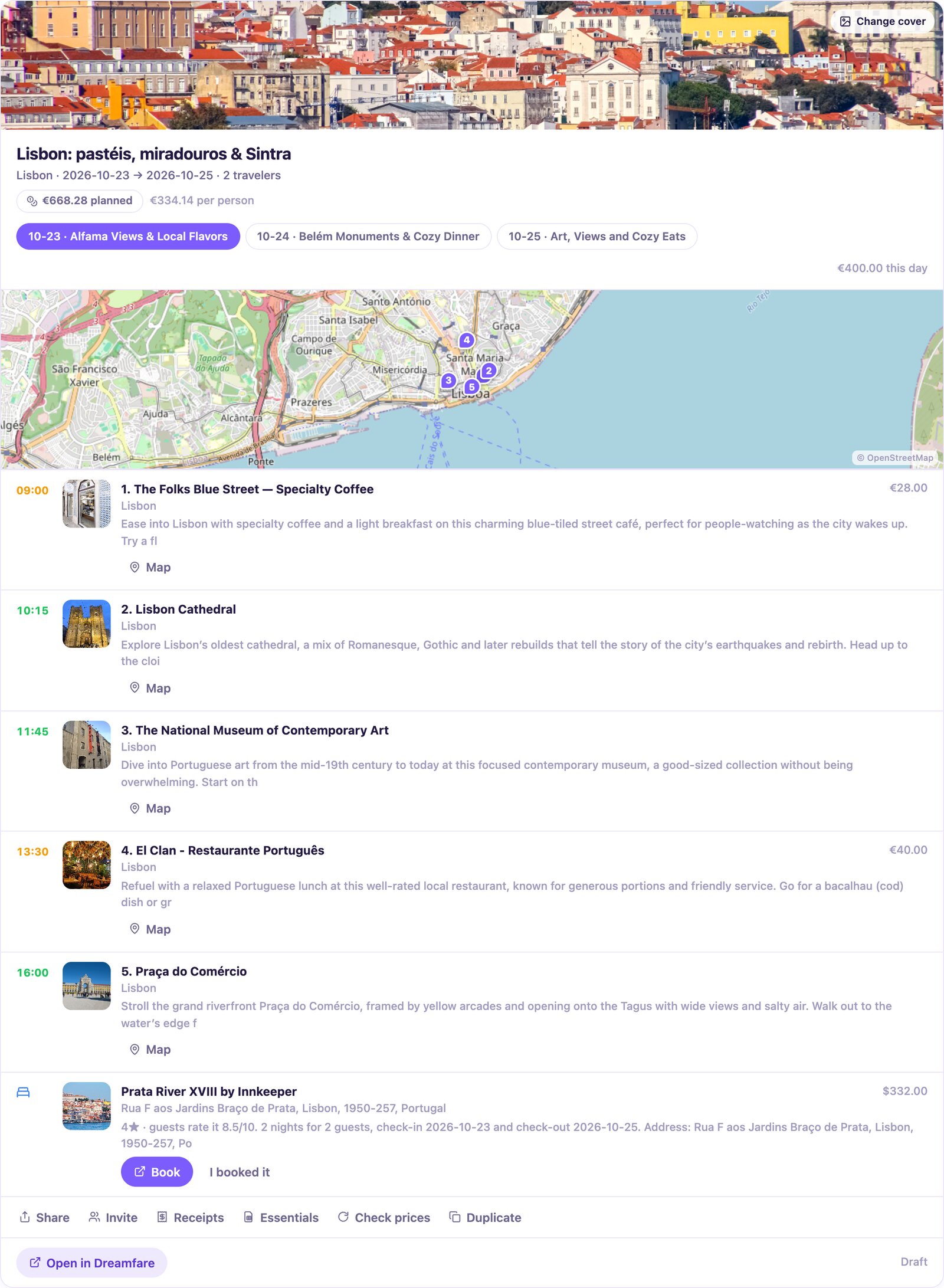
Dreamfare's results render as cards you can act on. These are real results, each under the prompt that produced it.
Find hotels near Alfama with free cancellation, tell me more about the best-rated one, then compare the top three.
What is still unbooked on my Lisbon trip? Give me the booking links.
The longer walkthrough
There is a full guide to planning a trip with Claude, with the prompts that work, the ones that waste a turn, and what to do when the plan is nearly right. It is worth reading once before your first real trip.
No connector needed
Or skip the setup and let Dreamfare plan it
The same planner sits inside the app, no connector, no settings screen. Say where, how long and who is coming, and it writes the day-by-day itinerary from real places, with the map, the prices and the booking links already attached. Already argued a plan into shape with Claude? Paste it into the app as text and the places in it become stops.
Questions people ask
- Is Claude good for trip planning?
- Yes. Claude is strong at the reasoning part: trading off neighborhoods, pace and budget in plain conversation, and changing its mind when you push back. Where it stops is holding the result, which is what the connector is for. With Dreamfare connected, the plan you argue into shape becomes a trip with real places, a map, prices and booking links, on the same account in the app. Technically, Dreamfare runs a remote MCP server over streamable HTTP with OAuth sign-in, and Claude talks to it as a custom connector.
- Which Claude plans can add a custom connector?
- All of them. Anthropic makes custom connectors available on Free, Pro, Max, Team and Enterprise. A free account can hold one custom connector at a time, and the paid plans do not cap it. Nothing on the Dreamfare side restricts which plan you are on.
- Does it work in Claude Desktop and on my phone?
- Yes. A connector added once is available on claude.ai, in Claude Desktop and in the Claude mobile apps, on the same account. Dreamfare's interactive trip cards render in Claude, and other MCP clients get the same tools as text.
- Can I use it from Claude Code, Cursor or my own agent?
- Yes. It is an ordinary remote MCP server, so any client that speaks streamable HTTP can add it, and the first tool call opens the sign-in in a browser. The full tool reference is public and readable without an account.
- Will Claude book my hotel?
- No. It finds stays and activities, prices them and attaches the one you choose to the right day. Paying happens on the partner's own site through the link on the stop, with your own details. Bookings you make can be marked so the trip stays accurate.
- What if I planned the trip before connecting anything?
- Paste the itinerary into Dreamfare as text. It is read the same way an article is, and the places in it become stops with real addresses. That works for a plan from any assistant.

Add the connector, then talk it through
One URL, one sign-in, and every trip you reason out has a real itinerary behind it.
Related reading
- AI itinerary plannerA day-by-day plan built from real venues you can open, move and book.Read more
- ChatGPT trip plannerKeep the plan ChatGPT wrote you, as a trip instead of a wall of text.Read more
- Travel guide to itineraryPaste the article you have had open for a week. Keep the places, drop the scrolling.Read more
Guide: plan a trip with ClaudeEvery tool the connector exposes
Using ChatGPT as well? The same trips are reachable there. Prefer to stay in the app? Dreamfare's own planner knows what you have saved.
Keep planning in Dreamfare
Keep your places and plans together. Create an account to save editable trips and come back when you are ready to go.
Free account. Some planning and import features require a plan or credits.
Read about plans, credit costs, supported imports and partner checkout.