Dreamfare for ChatGPT
ChatGPT Trip Planner App: Save and Book Your AI Itinerary
Dreamfare is the ChatGPT trip planner that turns a conversation into a real itinerary: every stop a place on a map, with hours, prices and booking links, saved to an account you can open on your phone, edit with friends and book from.
3 days · 2 travelers
09:00 · Miðvágur
13:30 · Gásadalur
18:00 · dinner at the harbor
2 nights · Tórshavn
The problem
A brilliant itinerary, trapped in a conversation
Chat plans a good trip and then loses it. There is no map, no dates you can put in a calendar, nothing to send to the person you are traveling with, and no way to book any of it. Three days later the thread is buried and you are rewriting the same prompt.
Setup
Connect it once, in four steps
- 1
Connect Dreamfare once
In ChatGPT's settings, open the section that holds apps and connectors, find Dreamfare Travel Assistant, and choose Connect.
- 2
Sign in to Dreamfare
A Dreamfare sign-in window opens. It is OAuth, so ChatGPT never sees your password, and you can disconnect it from ChatGPT's settings whenever you like.
- 3
Plan in the chat
Ask for the trip you want, or name Dreamfare in the message. Answers come back as cards you can act on without leaving the conversation.
- 4
Keep it in Dreamfare
Say to save it and the plan becomes a real trip: days, a map, a crew you can invite and booking links on the stops that have them.
If you cannot find it in the list
ChatGPT has renamed that settings section more than once, and what is available depends on your plan and platform. If your build supports adding a connector by URL, Dreamfare's endpoint is https://api.dreamfare.app/mcp over streamable HTTP. The connector page keeps the current instructions for both routes.
A real example
A food-first Lisbon trip, start to finish
Four messages. The plan is made in the chat, saved as a Dreamfare trip, given somewhere to sleep, and handed to the friend who is coming.
Three days in Lisbon in May, all about food. Markets, tascas, one nice dinner. Save it to Dreamfare.
Three days built around eating: Cais do Sodre and the market on day one, Alfama tascas on day two, a booked dinner on day three. Saved to Dreamfare as Lisbon, in May.
Add somewhere to stay near the market, under 200 a night, free cancellation.
Four options within a ten-minute walk, priced for your nights. I have added the best-rated one to the trip, on the right dates, with its booking link on the stop.
Make an invite link for Priya so she can edit it, and tell her dinner is booked.
Here is an editor invite link for the Lisbon trip, and I have posted in the trip chat that Friday dinner is booked.
What is left afterwards is a Dreamfare trip: three days on a map, a stay with a booking link, a crew of two and a chat. It opens on the phone, on the web, and in the next ChatGPT conversation.
What the answers look like
Cards you can act on, not paragraphs
Dreamfare's answers render as interactive cards inside ChatGPT. These are real results, each shown under the prompt that produced it.
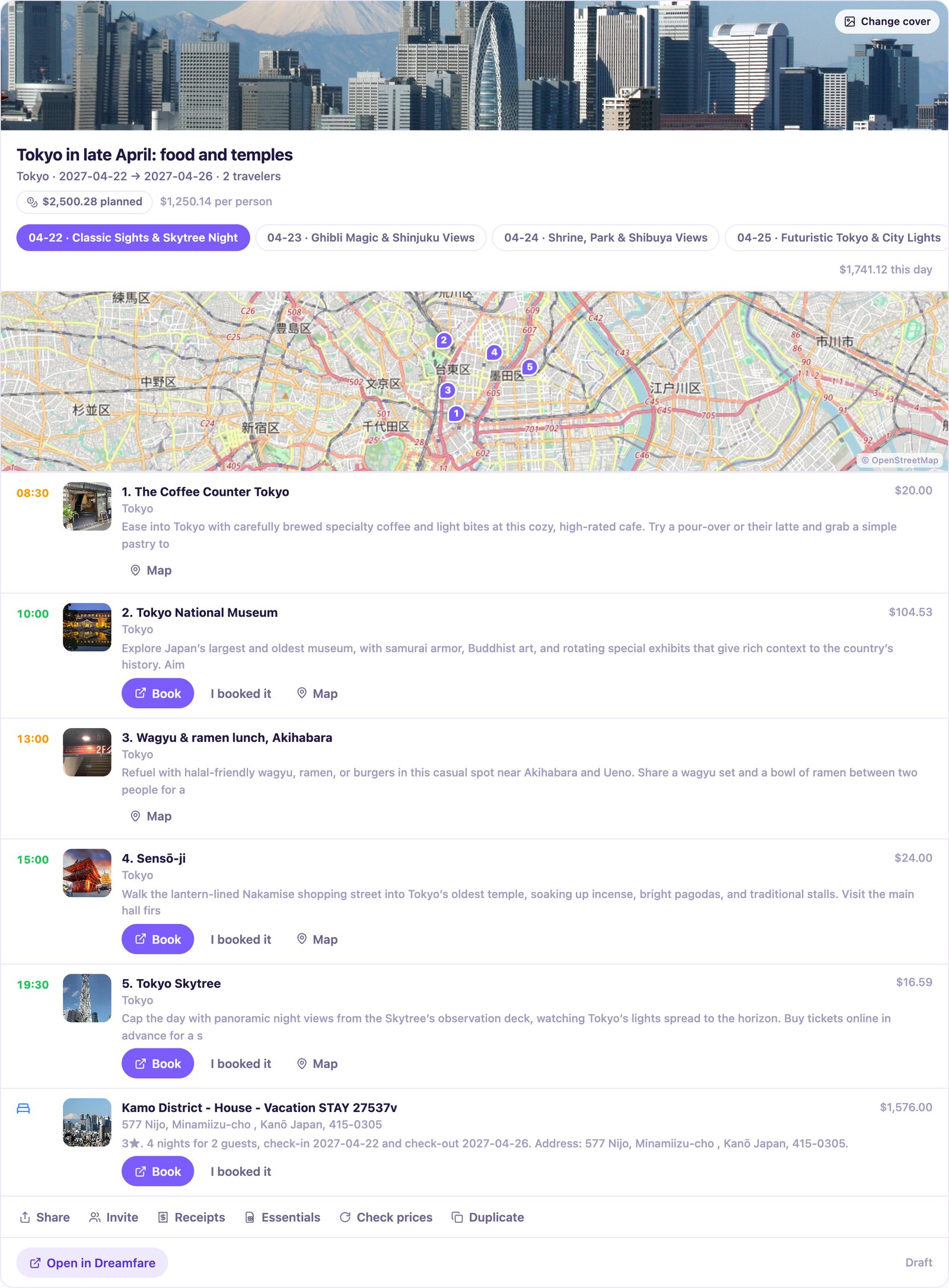
Plan 5 days in Tokyo for late April with a mix of food and temples, then save it to Dreamfare.
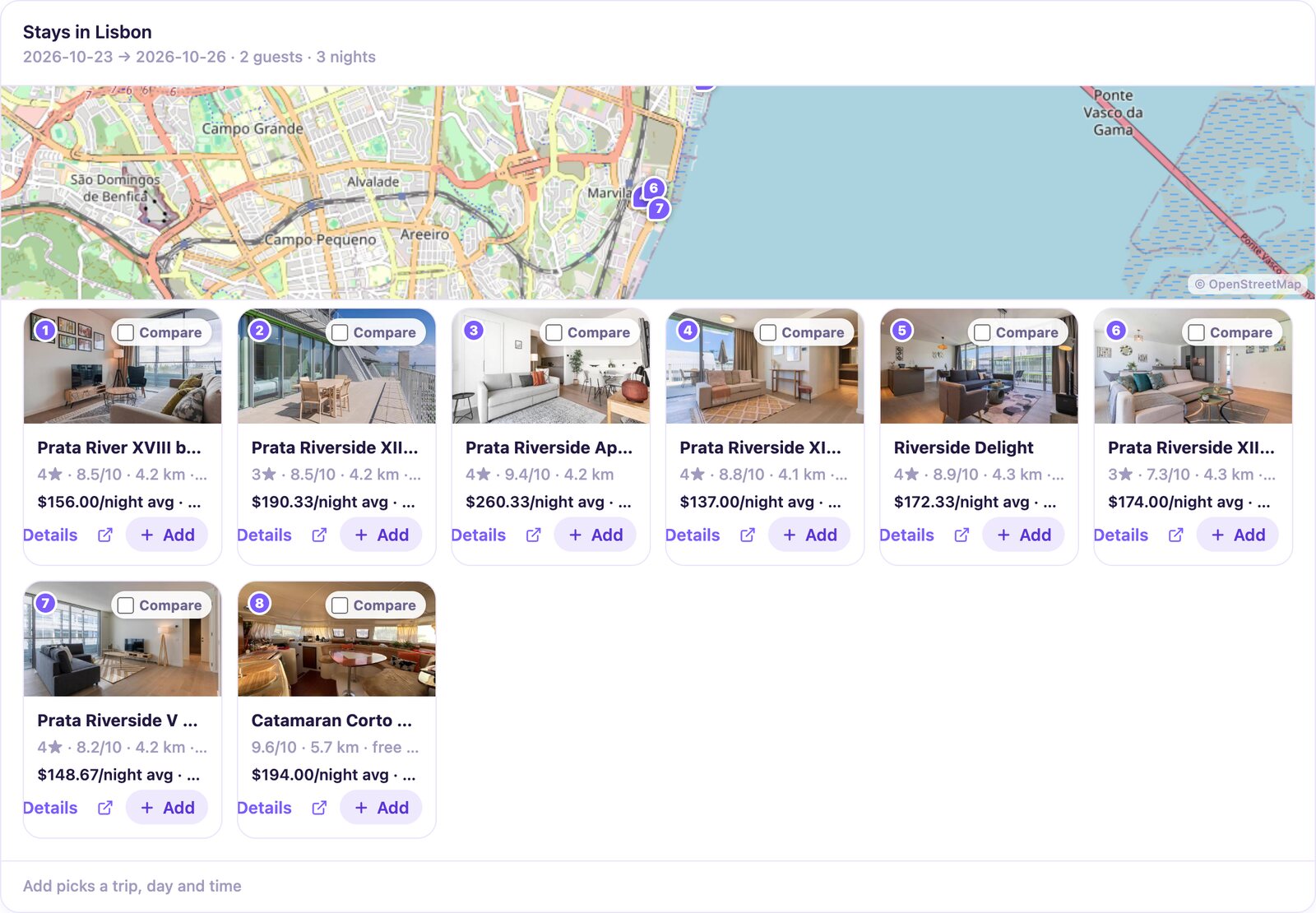
Find a hotel in Lisbon for May 10 to 12 under $200 a night and add the best one to my trip.
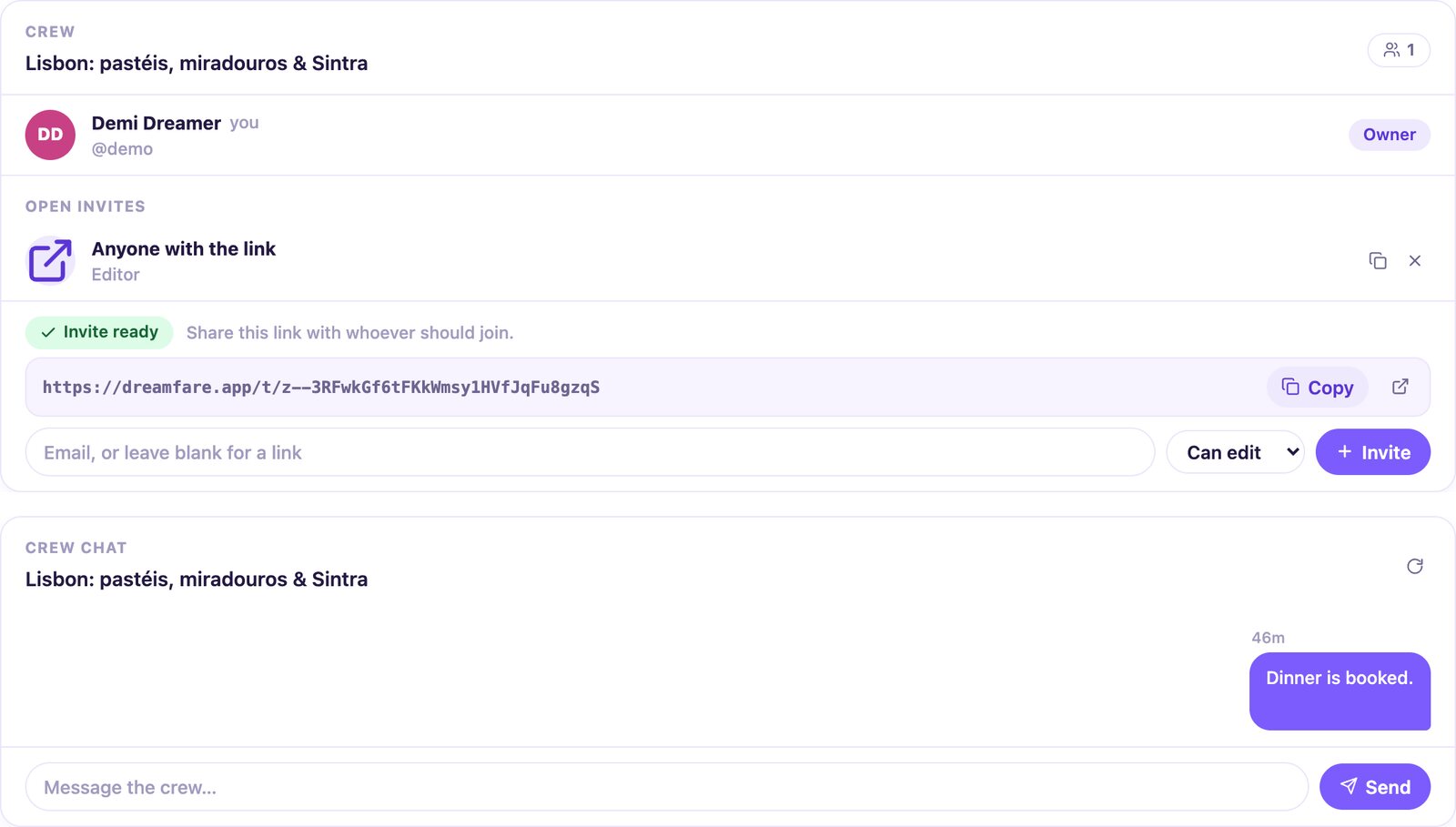
Make an invite link so a friend can edit my Lisbon trip, then post in the trip chat that dinner is booked.
Why bother saving it
What the chat cannot keep on its own
The plan gets a map and dates
A chat itinerary is a wall of text you lose in your history. Saved to Dreamfare it becomes days you can open on a phone, with every stop pinned.
Edit it anywhere, not only in the chat
Change a stop in the Dreamfare app, in the browser, or by asking ChatGPT again later. It is the same trip, so the three never disagree.
Other people can get in
Ask for an invite link in the chat and send it. Whoever opens it can edit or vote, and they never need a ChatGPT account to do it.
Bookable stops carry real links
Stays and activities come back with live prices and a partner link on the stop. Book through it and Dreamfare shares back part of the commission as travel credit.
What it can reach, and what it cannot
The connector acts only on your own Dreamfare account, with exactly the permissions you have in the app. Trips shared with you keep their roles. Nothing is booked or paid for on your behalf. You can disconnect it from ChatGPT's settings at any time, and your trips stay in Dreamfare when you do.
No connector needed
Or skip ChatGPT and let Dreamfare plan it
The same planner sits inside the app. Say where, how long and who is coming, and it writes the day-by-day itinerary from real places, with the map, the prices and the booking links already attached. Already have a plan ChatGPT wrote? Paste it into the app as text and the places in it become stops.
Questions people ask
- What exactly is the ChatGPT integration?
- Dreamfare runs a remote MCP server, and ChatGPT connects to it as an app. Once connected, ChatGPT can create and edit your Dreamfare trips, search stays and activities, import travel links, invite people and read what you already have, all as your own account.
- Can I use ChatGPT to plan a trip?
- Yes, and it is good at the first draft: the neighborhoods in a sensible order, food that sounds right, a day trip on the right day. What a chat cannot do is hold the plan. With Dreamfare connected, the same conversation produces a trip with real places on a map, hours, prices and booking links, saved to an account you can open on your phone. You can start the connection from ChatGPT and sign up during the sign-in step.
- Can ChatGPT see my other trips?
- Only what you ask it for, and only your own account, with the same access you have. Trips shared with you respect their roles, so being an editor on a friend's trip in Dreamfare is what makes it editable from the chat too.
- Does it book flights or hotels for me?
- No. It finds them, prices them and attaches them to the right day. Paying happens on the partner's own site through the link on the stop, with your own details.
- What if I already planned a trip in a chat without the connector?
- Paste the itinerary into Dreamfare as text. It is read the same way an article is, and the places in it become stops with real addresses. That works for a plan from any assistant, or from a friend's email.
- Is the ChatGPT trip planner free?
- The ChatGPT app is free to add, and every Dreamfare account gets a monthly Stardust allowance that covers AI plans and imports. AI planning and imports use your account's current plan or Stardust allowance. The app shows access, available credits and action costs. Premium offers a free trial where available; check the current offering and renewal terms before subscribing. Trips, saved places, the map, invites and booking links never need a paid plan. To disconnect, use ChatGPT's own settings, in the same place you connected it; everything already saved in Dreamfare stays where it is.

Connect it, then ask for the trip
One setup, and every plan you make in ChatGPT has somewhere to live afterwards.
Related reading
- AI itinerary plannerA day-by-day plan built from real venues you can open, move and book.Read more
- Claude trip plannerPlan out loud with Claude. Dreamfare holds the itinerary it produces.Read more
- Collaborative trip plannerOne trip everyone can edit, with the chat and the votes attached to it.Read more
Guide: plan a trip with ChatGPTDreamfare MCP: travel tools for AI agents
Using Claude instead? The Claude connector works the same way. No assistant at all? Dreamfare has its own planner.
Keep planning in Dreamfare
Keep your places and plans together. Create an account to save editable trips and come back when you are ready to go.
Free account. Some planning and import features require a plan or credits.
Read about plans, credit costs, supported imports and partner checkout.